
SIHOO
SIHOO M57 Ergonomic Mesh Office Chair, High Back Home Desk Chair with 3D Armrests, Lumbar Support and Adjustable Headrest, Comfortable Computer Chair, Big & Tall Office Chair Hold 330 LBS-Black
Excellent
In stock on Amazon.com
Buying Guide
Programming means long stretches of focused typing with few natural pauses, so the chair, keyboard and screen all need to hold up for hours. This guide covers the seat features that suit coding sessions, how to lay out a developer desk, and how to build breaks into deep work.
As an Amazon Associate I earn from qualifying purchases. We have not physically tested these chairs; scores come from manufacturer and Amazon specifications.
Top Pick
SIHOO
In stock on Amazon.com
Runner-Up
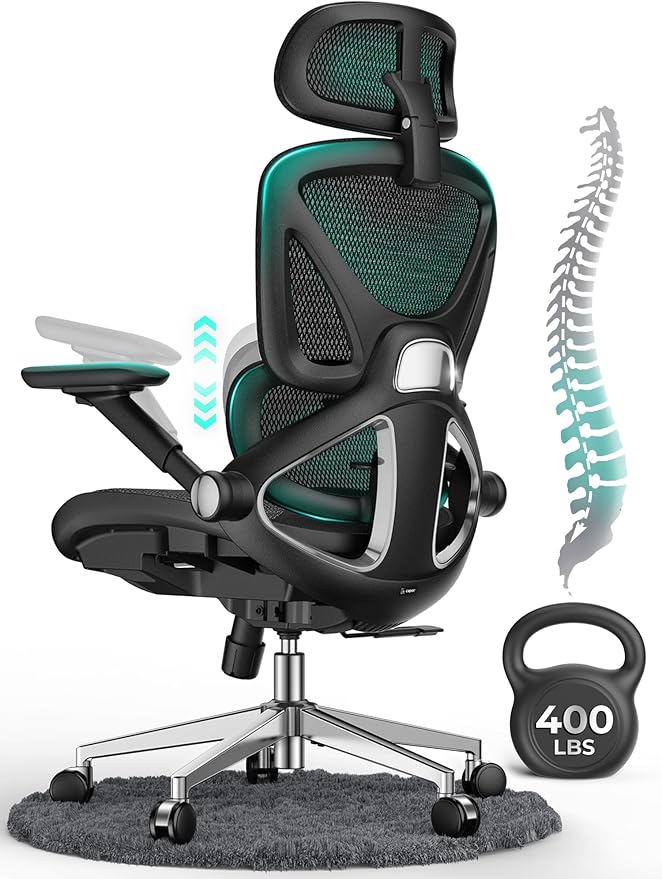
CAPOT
In stock on Amazon.com
Strong Option

ELABEST
In stock on Amazon.com
Amazon.com data updated October 13, 2026, 2:34 pm ET. Price and availability are accurate as of the time indicated and are subject to change. Any price and availability information displayed on Amazon.com at the time of purchase will apply.
A coding session can run for hours without you noticing, which is why the break advice from workplace sources matters here. OSHA's keyboard page recommends a five-minute break from computer tasks every hour, and Cornell University's ergonomics guide suggests resting the hands in a relaxed, flat, straight posture between bursts of typing, plus eye breaks and a brief rest break every 30 to 60 minutes.
Pair the chair choice with a timer or a build-time habit: stand up when the tests run.
OSHA notes that a proficient typist can exceed 18,000 keystrokes an hour, which it links to wrist and tendon injury risk, and it advises keeping wrists straight and the mouse close to the keyboard. Cornell recommends keeping the wrists flat and straight and the upper arm relaxed near the body when using the mouse.
That puts weight on the chair's armrests and seat height. Cornell cautions against resting your forearms on armrests all the time while typing, so use them for occasional support.
Developers often run two monitors. OSHA says a screen should sit directly in front of you, within 35 degrees left or right, with the top at or slightly below eye level and a viewing distance between 20 and 40 inches. Its guidance does not cover multiple screens, so treat the second one as a judgment call and keep the main display in front.
Easy swiveling can help you turn toward a second display, but check what each listing actually states about its base and swivel.
Programmers can use the long hours list as it stands; its table compares the back, seat cushion and armrests.
Not a special one, but a chair with the adjustments OSHA describes, such as lumbar support, seat height, seat depth and armrests, suits long keyboard work.
Cornell says there is no consistent research evidence that most current split keyboard designs give substantial postural benefits, and it advises trying any ergonomic product for at least a week. Keeping wrists straight and elbows close to your body matters more.
Tie breaks to events, such as builds or meetings, or use a timer. The aim is to rest the hands and change position regularly.
OSHA's checklist advises changing posture regularly and minimizing use time when a laptop is used outside the office, so for long sessions an external keyboard and a raised screen are the safer setup.
| # | Chair | Ergo Score | Price | Back | Seat cushion | Armrests | Buy |
|---|---|---|---|---|---|---|---|
| 1 | $199.99 | Mesh | Not listed by the seller | 3D adjustable | Check Price | ||
| 2 | $199.99 | Mesh | Not listed by the seller | 4D adjustable | Check Price | ||
| 3 | $349.99 | Mesh | Not listed by the seller | 4D adjustable | Check Price | ||
| 4 | $179.99 | Mesh | Mesh | 3D adjustable | Check Price | ||
| 5 | $595.00 | Mesh | Not listed by the seller | 4D adjustable | Check Price | ||
| 6 | $329.99 | Mesh | High-density foam | 3D adjustable | Check Price | ||
| 7 | $199.99 | Mesh | Mesh | 3D adjustable | Check Price | ||
| 8 | $299.99 | Mesh | Not listed by the seller | 4D adjustable | Check Price |
Amazon.com data updated October 13, 2026, 2:34 pm ET. Price and availability are accurate as of the time indicated and are subject to change. Any price and availability information displayed on Amazon.com at the time of purchase will apply.
Chairs are ranked by Ergo Score, computed from manufacturer and Amazon specifications with the same published formula for every chair (how we rate). Specifications and prices come from the Amazon.com listings, checked on October 13, 2026, 2:34 pm ET. We have not physically tested these chairs.
As an Amazon Associate I earn from qualifying purchases. We have not physically tested these chairs; scores come from manufacturer and Amazon specifications.


